
The Stack Data Structure in Python

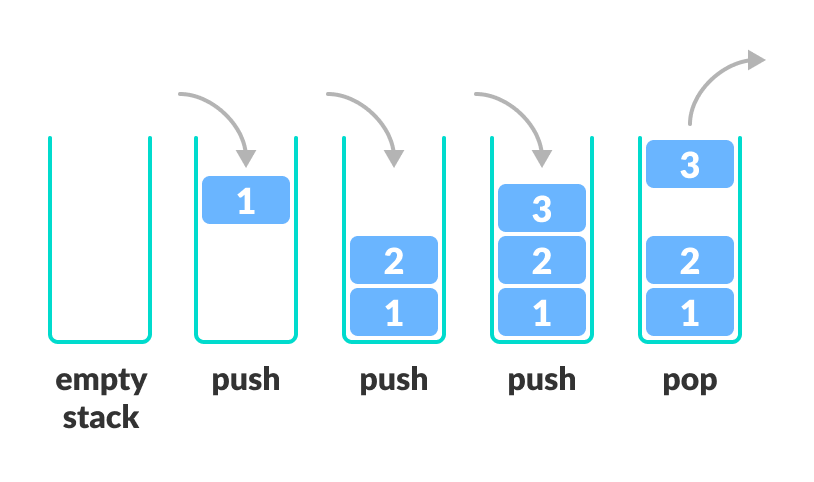
Every programmer eventually runs into the concept of a stack. It shows up in web browsers, text editors, algorithms, and even inside Python itself. Despite being one of the simplest data structures, it’s also one of the most powerful. Understanding how stacks work helps you reason about recursion, undo systems, and even how programming languages manage memory.
Let’s explore what stacks are, how to implement them in Python, and where they’re used in real life.
What Is a Stack?
A stack is a collection that follows the Last In, First Out (LIFO) principle.
The idea is simple: the last item you place on the stack is the first one that comes off — just like a stack of plates at a buffet.
If you’ve ever pressed Undo multiple times in a document editor, you’ve interacted with a stack. Each action is pushed onto the stack, and “Undo” simply pops the latest one off.
Here’s what a stack looks like conceptually:
Top ->    [C]
          [B]
Bottom -> [A]
Push [D] onto the stack and it goes to the top. Pop an item, and D is the first to go.
Using Lists as Stacks
Python doesn’t have a dedicated stack class in the standard library, but its built-in list type works perfectly fine for the job. The two main operations are append()stack = []

stack.append(”A”)
stack.append(”B”)
stack.append(”C”)

print(stack)
# [’A’, ‘B’, ‘C’]

item = stack.pop()
print(”Popped:”, item)
print(”Now:”, stack)

# [’A’, ‘B’, ‘C’]
# Popped: C
# Now: [’A’, ‘B’] for pushing an item and pop() for removing one.
This approach is simple and effective for most tasks, though list performance can degrade slightly with very large stacks since lists are optimized for random access, not necessarily stack operations.
Using collections.deque
For heavier or performance-sensitive workloads, Python provides deque from the collections module. A deque (double-ended queue) is built for fast appends and pops from both ends — giving you true O(1) performance for stack operations.
from collections import deque

stack = deque()

stack.append(”Task 1”)
stack.append(”Task 2”)
stack.append(”Task 3”)

print(stack.pop())  # Task 3
print(stack.pop())  # Task 2
deque is ideal when you need both speed and flexibility. You can easily reverse data, simulate browser navigation, or manage undo actions without worrying about performance overhead.
Peeking and Checking Emptiness
You’ll often need to check what’s currently on top of the stack without removing it. You stack = [”login”, “dashboard”, “settings”]
print(”Current page:”, stack[-1])

# Current page: settingscan “peek” by accessing the last element with stack[-1].
It’s also important to handle empty stacks gracefully. Calling pop() on an empty structure raises an IndexError, so it’s good practice to check before you remove an item.
if stack:
    item = stack.pop()
else:
    print(”Stack is empty”)
This small check saves you from a lot of unexpected runtime errors.
Real-World Applications of Stacks
Stacks appear in more places than you might think. They power many of the systems you use every day.
Undo/Redo Systems: Each action (like typing or deleting) gets pushed to a stack. Undo pops the last action, and redo pushes it onto another.
Browser Navigation: Every time you visit a page, it’s added to a stack. Clicking “Back” pops the current page off.
Expression Evaluation: Compilers and interpreters use stacks to process operators and operands.
Function Calls: When Python runs a function, it stores the state on the call stack. That’s why deep recursion can cause a “stack overflow.”
Once you start noticing it, you’ll realize stacks are pretty much everywhere.
Example: Checking for Balanced Parentheses
Here’s a simple and classic use case for stacks — validating that parentheses in an expression are properly balanced.
def is_balanced(expr):
    stack = []
    pairs = {’)’: ‘(’, ‘]’: ‘[’, ‘}’: ‘{’}

    for char in expr:
        if char in ‘([{’:
            stack.append(char)
        elif char in ‘)]}’:
            if not stack or stack[-1] != pairs[char]:
                return False
            stack.pop()
    return not stack

print(is_balanced(”(a + b) * [c - d]”))   # True
print(is_balanced(”(a + b]”))             # False
The logic is elegant:
Push opening brackets onto the stack.
2. When you see a closing one, check if it matches the last opener.
3. If it doesn’t, or if the stack is empty, the string is unbalanced.
By the end, if the stack is empty, everything matched up correctly.
Building Your Own Stack Class
Let’s take it one step further and wrap all of this logic into a custom class.
This makes the stack reusable, clean, and easy to understand in larger projects.
class Stack:
    def __init__(self):
        self.items = []

    def push(self, item):
        self.items.append(item)

    def pop(self):
        if not self.is_empty():
            return self.items.pop()
        raise IndexError(”Pop from empty stack”)

    def peek(self):
        if not self.is_empty():
            return self.items[-1]
        raise IndexError(”Peek from empty stack”)

    def is_empty(self):
        return len(self.items) == 0

    def size(self):
        return len(self.items)

# Example usage
stack = Stack()
stack.push(10)
stack.push(20)
stack.push(30)

print(”Top element:”, stack.peek())  # 30
print(”Removed:”, stack.pop())       # 30
print(”Size:”, stack.size())         # 2
With this structure, you can easily plug a stack into larger systems or use it to simulate recursive behavior.
Why Stacks Matter
Stacks are one of those tools you’ll use without even realizing it.
They’re the reason undo buttons work, the reason recursive functions don’t lose their place, and the reason compilers can keep track of nested expressions.
When you write code that manages order, memory, or state, chances are you’re relying on a stack somewhere under the hood.
Learning stacks gives you a foundation for understanding queues, trees, graphs, and even algorithms like depth-first search.
Once you’re comfortable with this concept, everything else in data structures starts to make a lot more sense.
Next Steps
If you want to go deeper, you can…
Try implementing a stack using two queues.
Write a small program to reverse a string using a stack.
Build a browser navigation simulation that keeps track of pages visited.